






What Is the Difference Between Hardware and Software With Examples and Uses
In computer science, understanding the difference between hardware and software is fundamental to learning how computers function. Every digital device, from smartphones to supercomputers, works through a combination of physical components and programmed instructions. Hardware refers to the tangible parts of a computer system, while software consists of the programs and data that control those parts. Together, they form a complete computing system. Learning about hardware and software helps students grasp how data is processed, stored, and displayed in modern technology.
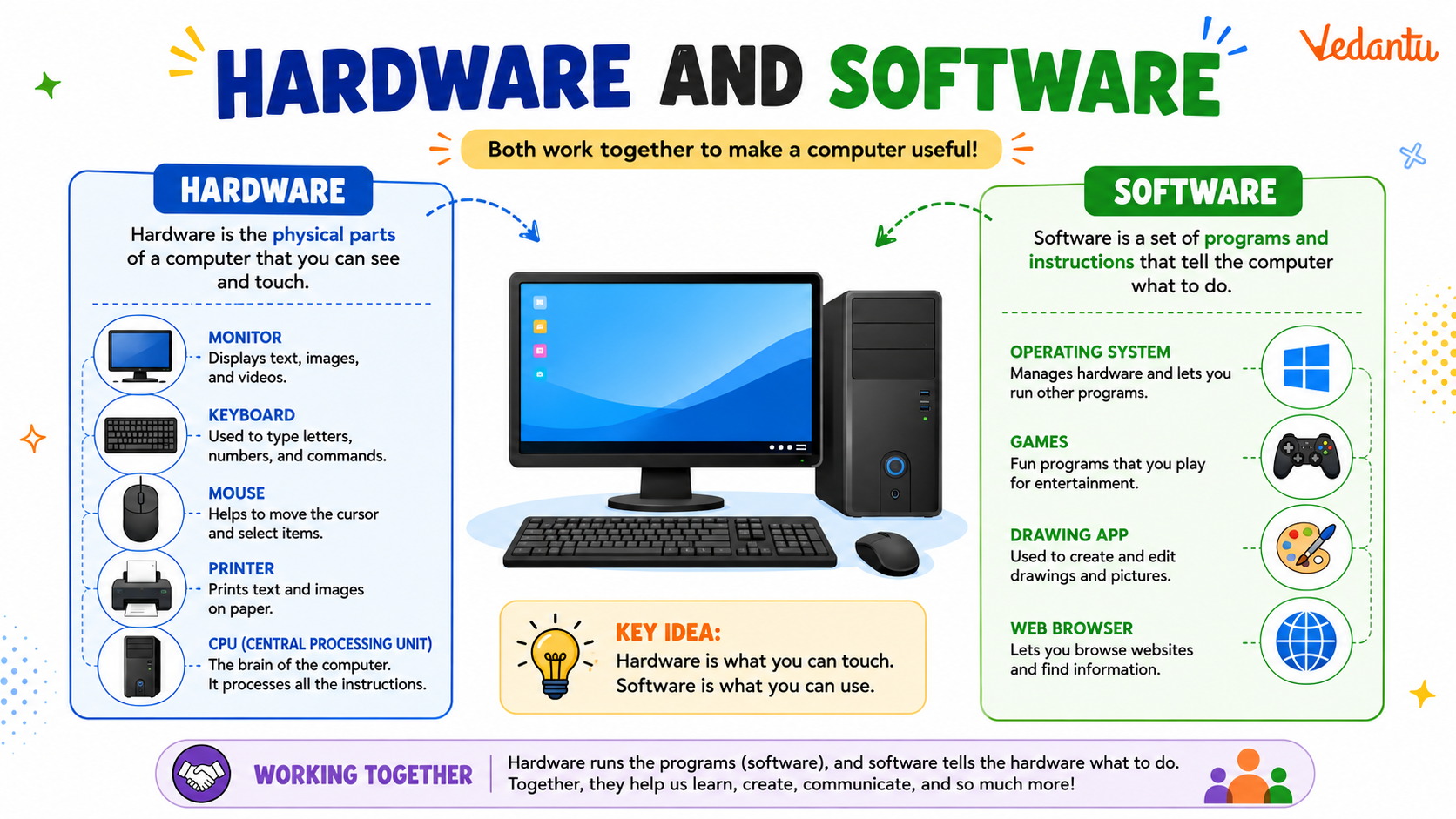
Definition and Meaning
Hardware and Software in computer science are the two essential components of a computer system. They work together to perform tasks such as calculations, data storage, communication, and multimedia processing.
- Hardware - The physical and tangible components of a computer that can be touched, such as the keyboard, monitor, CPU, and hard drive.
- Software - The set of programs, instructions, and data that tell the hardware what to do.
- System Software - Software that manages hardware and system resources, such as operating systems.
- Application Software - Programs designed for users to perform specific tasks, such as word processing or web browsing.
How It Works - Working Principle
The hardware and software working principle is based on coordination between physical components and programmed instructions. Software provides commands, and hardware executes those commands to produce output.
- Input - The user enters data through input devices like a keyboard or mouse.
- Processing - The CPU processes the data according to instructions provided by software.
- Storage - Data and instructions are stored in memory or storage devices.
- Output - The processed result is displayed through output devices such as a monitor or printer.
Without software, hardware cannot function meaningfully, and without hardware, software cannot run. Both are interdependent parts of a computing system.
Types and Classification
Types of Hardware
- Input Devices - Keyboard, mouse, scanner, microphone.
- Output Devices - Monitor, printer, speakers.
- Processing Devices - CPU, GPU.
- Storage Devices - Hard disk, SSD, USB drive.
Types of Software
- System Software - Windows, Linux, macOS.
- Application Software - MS Word, Excel, web browsers.
- Utility Software - Antivirus programs, disk cleaners.
- Programming Software - Compilers, interpreters, IDEs.
Components and Structure
A computer system is structured around key hardware and software components that interact continuously.
- Central Processing Unit - Executes instructions and performs calculations.
- Memory Unit - RAM and ROM store data and instructions.
- Storage Unit - Stores data permanently.
- Operating System - Acts as an interface between hardware and user.
- Application Programs - Enable users to perform specific tasks.
Features and Characteristics
- Hardware is physical and subject to wear and tear.
- Software is intangible and can be easily updated.
- Both are essential for system functionality.
- Software controls hardware operations.
- Hardware performance affects software efficiency.
Advantages
- Automation - Performs repetitive tasks efficiently.
- Speed - Processes large volumes of data quickly.
- Accuracy - Reduces human error.
- Versatility - Supports multiple applications.
Disadvantages / Limitations
- Hardware components can fail or become obsolete.
- Software may contain bugs or security vulnerabilities.
- High cost of maintenance and upgrades.
- Requires regular updates and technical support.
Applications and Use Cases
- Education - Online learning platforms and digital classrooms.
- Business - Accounting, payroll, inventory management.
- Healthcare - Patient record management systems.
- Entertainment - Gaming systems and multimedia applications.
- Communication - Email, video conferencing, social media platforms.
Quick Facts About Hardware and Software
| Category | Hardware | Software |
|---|---|---|
| Nature | Physical components | Programs and instructions |
| Dependency | Needs software to function | Needs hardware to run |
| Examples | CPU, RAM, Keyboard | Windows, MS Word, Chrome |
| Upgrade | Physical replacement | Update or reinstall |
This table highlights the core differences between hardware and software in computer science and clarifies their roles within a computing system.
Interesting Facts About Hardware and Software
- The first computer hardware filled entire rooms and consumed huge amounts of electricity.
- Operating systems are the most important system software in any computer.
- Firmware is a special type of software embedded directly into hardware devices.
- Modern smartphones combine powerful hardware with advanced software in compact devices.
- Software can be open source or proprietary depending on licensing.
- Hardware performance improvements often lead to more advanced software development.
Conclusion
Understanding hardware and software is essential for building a strong foundation in computer science. Hardware provides the physical structure of a computer system, while software delivers the instructions that bring it to life. Their interdependence enables everything from basic calculations to complex artificial intelligence systems. By learning the definition, types, features, advantages, and applications of hardware and software, students gain insight into how modern technology operates and evolves.
FAQs on Hardware and Software in Computer Science Explained Clearly
1. What is Hardware and Software in Computer Science?
Hardware and Software are the two main components of a computer system where hardware refers to physical devices and software refers to programs and instructions that run on those devices.
- Hardware: CPU, keyboard, monitor, hard disk, printer
- Software: Operating system, web browsers, applications, programming tools
2. What is the difference between Hardware and Software?
The main difference between hardware and software is that hardware is tangible physical equipment while software is intangible code or programs that control the hardware.
- Hardware can be seen and touched
- Software is written using programming languages like C, Java, or Python
- Hardware needs software to function properly
3. What are the main types of computer hardware?
Computer hardware is classified into different types based on functionality such as input, output, processing, and storage devices.
- Input Devices: Keyboard, mouse, scanner
- Output Devices: Monitor, printer, speakers
- Processing Devices: CPU, GPU
- Storage Devices: HDD, SSD, USB drive
4. What are the main types of software?
Software is broadly categorized into system software, application software, and programming software based on its purpose and usage.
- System Software: Operating system like Windows, Linux
- Application Software: MS Word, web browsers, games
- Programming Software: Compilers, interpreters, IDEs
5. How do hardware and software work together?
Hardware and software work together through the operating system which acts as an interface between user applications and physical components.
- Software sends instructions to the CPU
- Hardware executes operations like processing and storage
- Device drivers help software communicate with hardware devices
6. What are the advantages and disadvantages of hardware and software?
Hardware provides physical computing power while software provides functionality, but both have limitations in cost, maintenance, and security.
- Hardware Advantages: High performance, physical processing capability
- Hardware Disadvantages: Expensive upgrades, wear and tear
- Software Disadvantages: Bugs, security vulnerabilities, compatibility issues
7. What is system software and how is it related to hardware?
System software is a type of software that manages hardware resources and provides a platform for application programs.
- Operating System: Manages CPU, memory, storage
- Device Drivers: Control hardware peripherals
- Ensures smooth interaction between hardware and application software
8. Can a computer work without hardware or software?
A computer system cannot function without both hardware and software because hardware executes tasks while software provides instructions.
- Without hardware, software cannot run
- Without software, hardware cannot perform meaningful tasks
- Both are essential for system operations and computing processes
9. What are examples of hardware and software used in real-world applications?
In real-world applications, hardware devices and software programs work together in domains like web development, artificial intelligence, and cloud computing.
- Hardware: Servers, routers, data center storage
- Software: Databases, web applications, AI algorithms
- Used in banking systems, e-commerce platforms, and cybersecurity systems
10. Why are hardware and software important for exams and interviews?
Understanding hardware and software concepts is important for computer science exams, competitive tests, and technical interviews.
- Common topic in school and college curricula
- Frequently asked in IT interviews and government exams
- Forms the foundation for advanced topics like operating systems, networking, and programming
