



Types of Computer Memory and How Primary and Secondary Memory Work
Computer Memory is one of the most essential components of a computer system. It is responsible for storing data, instructions, and results so that the processor can access them quickly whenever needed. Without memory, a computer cannot perform calculations, run programs, or even start properly. In computer science, understanding computer memory helps students learn how data is stored, managed, and retrieved efficiently. It plays a crucial role in system performance, multitasking, and overall computing efficiency, making it a foundational concept in both hardware and software studies.
Definition and Meaning
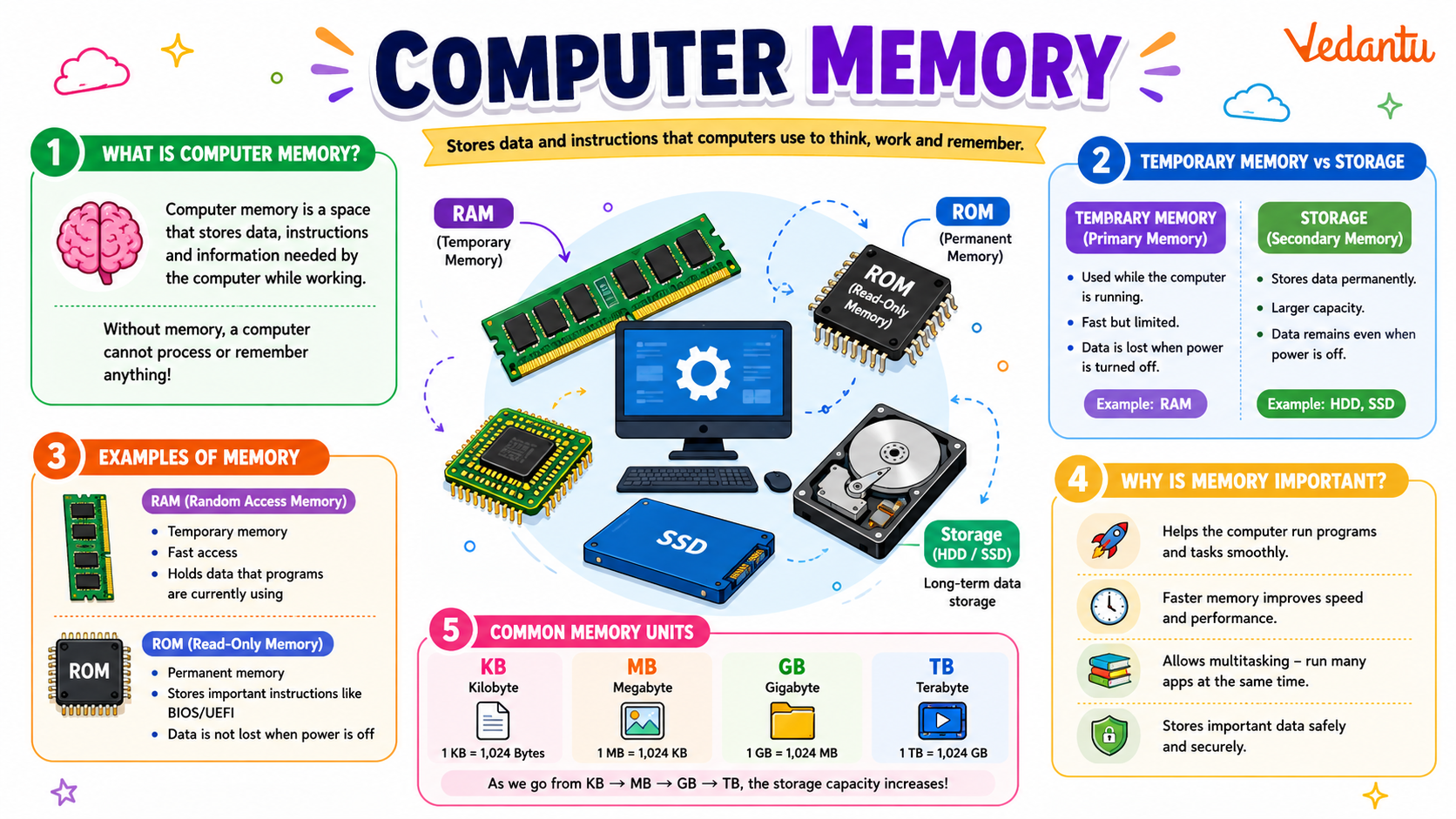
Computer Memory definition refers to the storage space in a computer where data and instructions are kept for processing. It allows the system to store information temporarily or permanently for future use.
- Memory - A hardware component that stores data and instructions.
- Primary Memory - Directly accessible by the CPU.
- Secondary Memory - Used for long term data storage.
- Volatile Memory - Loses data when power is off.
- Non volatile Memory - Retains data even without power.
How It Works - Working Principle
Computer Memory working involves storing binary data in the form of bits and bytes. The CPU interacts with memory to read instructions and write results during program execution.
- When a program is executed, it is loaded from secondary memory into primary memory.
- The CPU fetches instructions from memory using the address of each memory location.
- Data is processed in the CPU registers.
- The processed result is written back into memory.
- If required, data is saved permanently in secondary storage.
Each memory cell has a unique address, and data is stored in binary format 0s and 1s. Faster memory allows quicker data access and improves system performance.
Types and Classification
Computer Memory types are broadly classified into primary and secondary memory.
Types of Computer Memory
| Type | Features | Examples |
|---|---|---|
| Primary Memory | Fast, directly accessed by CPU, limited capacity | RAM, ROM, Cache |
| Secondary Memory | Slower, large storage, permanent storage | Hard Disk, SSD, USB Drive |
Primary Memory is also called main memory, while Secondary Memory is used for long term storage of files and programs.
Components and Structure
The structure of computer memory consists of different interconnected components that support data storage and retrieval.
- RAM (Random Access Memory) - Temporarily stores running programs and data.
- ROM (Read Only Memory) - Stores firmware and boot instructions.
- Cache Memory - Very fast memory between CPU and RAM.
- Registers - Small storage units inside the CPU for immediate processing.
These components work together to ensure efficient data processing and system performance.
Features and Characteristics
- Stores data in binary form.
- Organized into memory cells with unique addresses.
- Supports read and write operations.
- Available in volatile and non volatile forms.
- Performance depends on speed, size, and latency.
Advantages
- Enables fast data access and processing.
- Improves multitasking capabilities.
- Stores both instructions and results.
- Essential for running operating systems and applications.
Disadvantages and Limitations
- Volatile memory loses data when power is off.
- Primary memory is expensive compared to secondary storage.
- Limited capacity in high speed memory.
- Memory failures can affect system stability.
Applications and Use Cases
Computer Memory applications are seen in every computing device and digital system.
- Running operating systems and software applications.
- Storing documents, images, and multimedia files.
- Supporting gaming and graphics processing.
- Handling databases and enterprise systems.
- Used in smartphones, embedded systems, and IoT devices.
Quick Facts About Computer Memory
| Category | Details |
|---|---|
| Type | Primary and Secondary |
| Measured In | Bits, Bytes, KB, MB, GB, TB |
| Access Speed | Cache > RAM > Secondary Storage |
| Volatility | Volatile and Non volatile |
These quick facts highlight the basic technical details related to computer memory in computer science.
RAM vs ROM Comparison
| RAM | ROM |
|---|---|
| Volatile memory | Non volatile memory |
| Read and Write | Mostly Read Only |
| Temporary storage | Permanent storage |
RAM is used for temporary data storage during processing, while ROM stores permanent instructions such as boot programs.
Interesting Facts About Computer Memory
- The first computers used magnetic drums as memory devices.
- Cache memory is much faster than RAM but smaller in size.
- Modern SSDs have no moving parts, unlike traditional hard disks.
- Memory speed directly impacts gaming and high performance computing.
- Cloud storage acts as remote secondary memory over the internet.
- Memory hierarchy is designed to balance cost, speed, and capacity.
Conclusion
Computer Memory is a fundamental concept in computer science that enables data storage, instruction execution, and efficient processing. From RAM and ROM to secondary storage devices, each type plays a specific role in system functionality. Understanding computer memory types, features, advantages, and applications helps students grasp how computers operate internally. A strong knowledge of memory systems is essential for learning programming, system design, and hardware architecture, making it a core topic in modern computing education.
FAQs on Computer Memory in Computer Organization and Architecture
1. What is Computer Memory in Computer Science?
Computer Memory is the storage component of a computer system that stores data, instructions, and programs for processing by the CPU.
- Stores input data, intermediate results, and final output
- Works closely with the processor and operating system
- Essential for running software, applications, and algorithms
2. What are the different types of Computer Memory?
Computer Memory is broadly classified into Primary Memory and Secondary Memory based on speed, accessibility, and storage capacity.
- Primary Memory: RAM, ROM, Cache
- Secondary Memory: Hard Disk, SSD, USB drives
- Primary memory is faster but smaller, secondary memory is slower but larger
3. What is the difference between RAM and ROM?
The main difference between RAM and ROM is that RAM is volatile memory used for temporary storage, while ROM is non-volatile memory used for permanent instructions.
- RAM: Temporary, fast, used during program execution
- ROM: Permanent, stores firmware and boot instructions
- RAM loses data when power is off; ROM does not
4. How does Computer Memory work?
Computer Memory works by storing binary data (0s and 1s) in memory cells that the CPU can read from and write to during program execution.
- Data is stored in memory addresses
- The CPU accesses memory using address and data buses
- Managed by the operating system for efficient processing
5. What is Cache Memory and why is it important?
Cache Memory is a small, high-speed memory located close to the CPU that stores frequently used data to improve performance.
- Faster than RAM
- Reduces data access time
- Common levels: L1, L2, L3 Cache
6. What are the key features of Primary Memory?
Primary Memory is directly accessible by the CPU and is essential for executing programs and running operating systems.
- High speed access
- Limited storage capacity
- Includes RAM, ROM, and Cache
7. What are the advantages and disadvantages of Computer Memory?
Computer Memory enables fast data processing but varies in cost, speed, and storage limitations depending on type.
- Advantages: Fast access, efficient multitasking, supports complex algorithms
- Disadvantages: Volatile memory loses data, high-speed memory is expensive
8. What is Virtual Memory in an Operating System?
Virtual Memory is a memory management technique where the operating system uses secondary storage to extend available RAM.
- Uses hard disk or SSD as temporary RAM
- Implements paging or segmentation
- Improves multitasking and program execution
9. How is Computer Memory measured?
Computer Memory is measured in bytes and their multiples, representing the amount of data that can be stored.
- 1 Byte = 8 bits
- Units: KB, MB, GB, TB
- Used to specify RAM size, storage devices, and cache capacity
10. Why is Computer Memory important for exams and interviews?
Computer Memory is a fundamental topic in Computer Science exams and technical interviews because it affects system performance and program execution.
- Common in school, college, and competitive exams
- Frequently asked in operating system and computer organization interviews
- Important for understanding data structures, algorithms, and memory management
