



What Is the Process Of Saving A Drawing and How It Works in Graphics Applications
The Process Of Saving A Drawing is an essential skill in computer applications, especially when working with drawing software such as MS Paint or other graphic design tools. Saving a drawing ensures that the artwork or project is stored permanently on a computer or external storage device. Without saving, all changes may be lost when the program is closed. Understanding the correct steps helps students protect their work, organize files properly, and choose suitable file formats. In computer science, this basic operation teaches important concepts related to file management, storage, and data preservation.
Definition and Meaning
Process Of Saving A Drawing definition refers to the step by step method of storing a digital drawing file onto a storage device such as a hard disk, pen drive, or cloud storage.
- Save - Storing the current file with its existing name and location.
- Save As - Saving the file with a new name, location, or format.
- File Extension - The format in which the drawing is saved, such as .png, .jpg, or .bmp.
- Storage Device - The hardware where the file is stored.
How It Works - Working Principle
The Process Of Saving A Drawing working involves interacting with the File menu of a drawing application and choosing the appropriate save option. The system stores the drawing data in a selected file format at a chosen location.
- Click on the File menu in the drawing software.
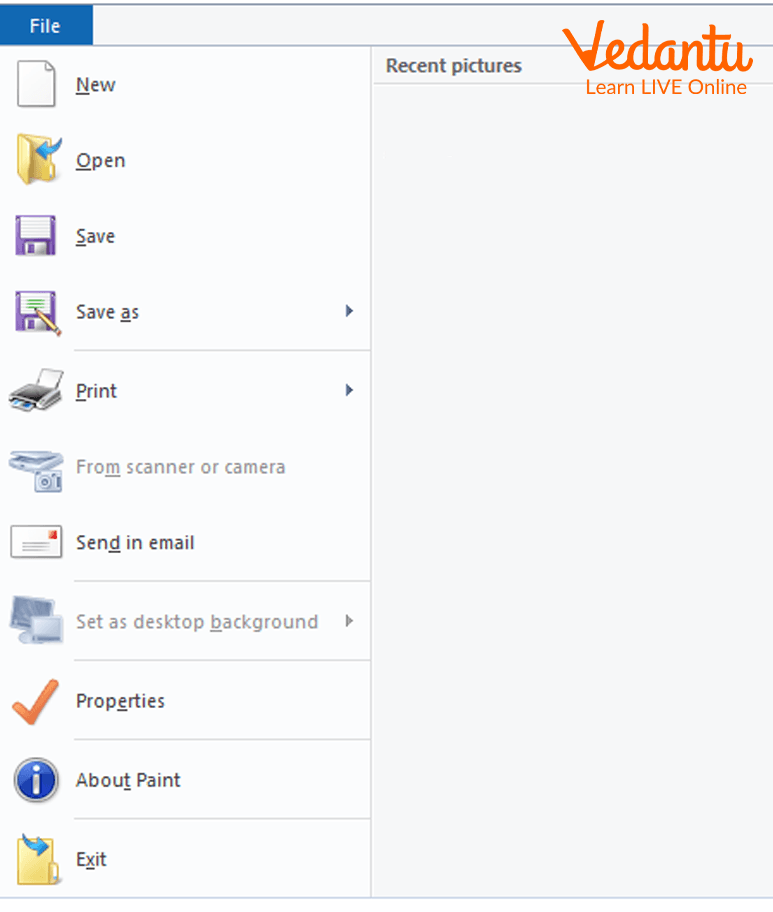
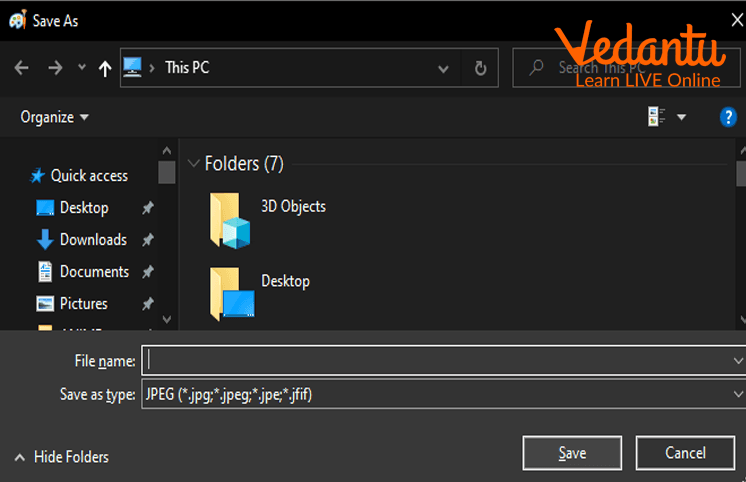
- Select the Save As option from the menu.
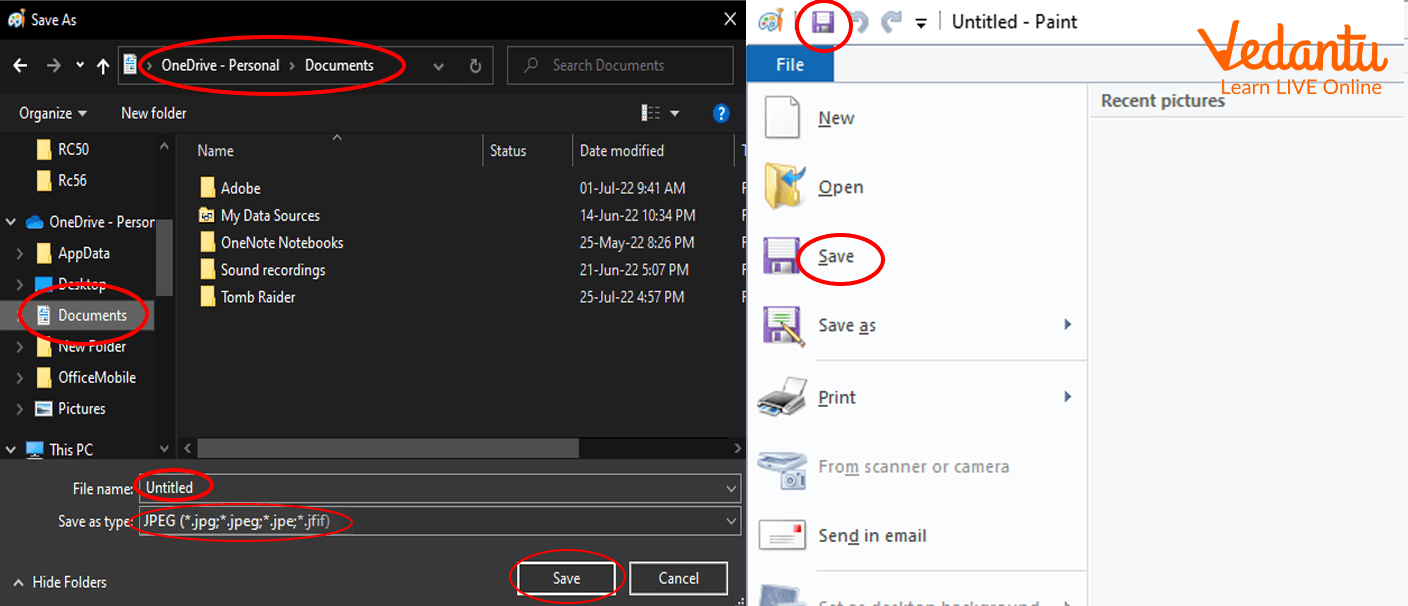
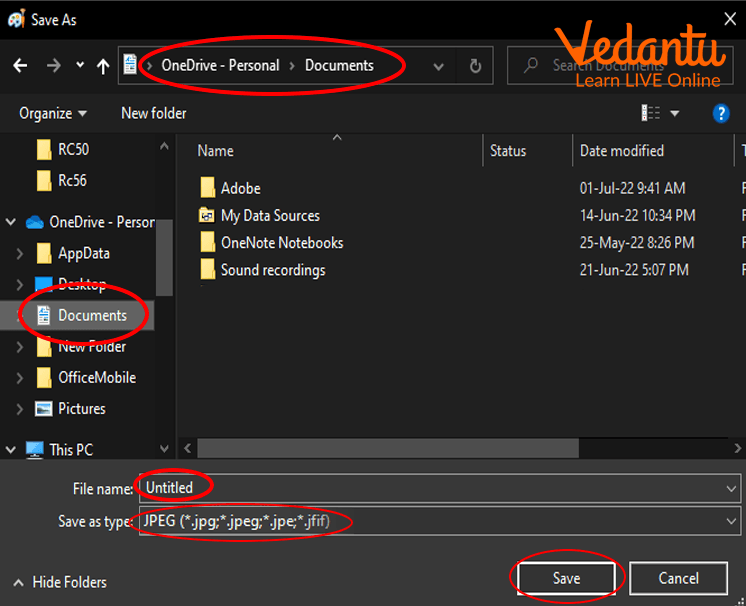
- In the Save As window, type the desired file name.
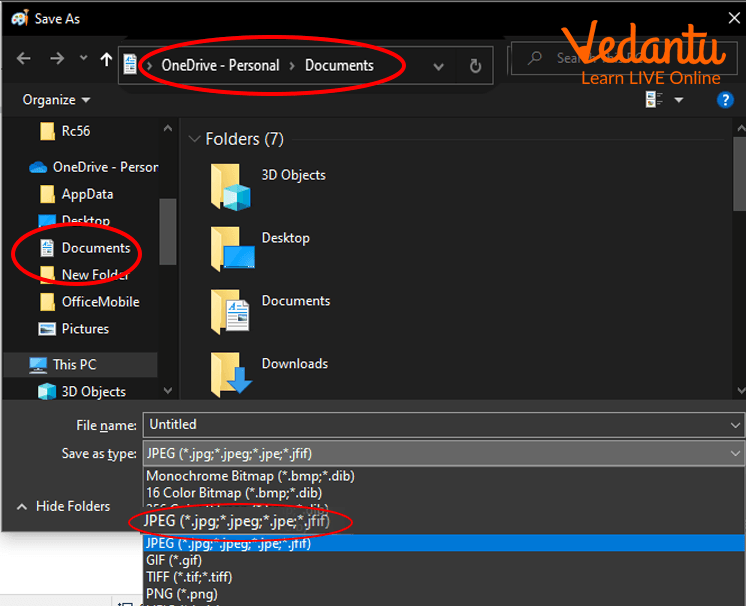
- Choose the required file extension or format.
- Click on the Save button to store the drawing.
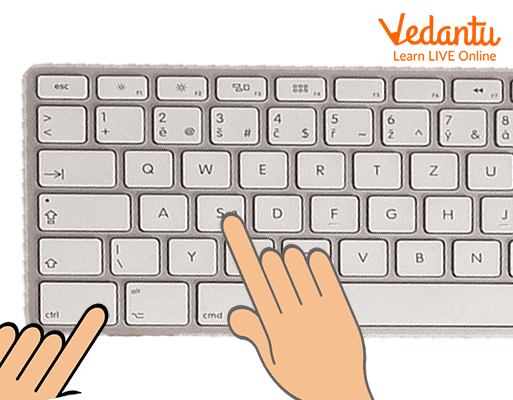
- You can also press Ctrl + S on the keyboard to quickly save the file.
Once saved, the drawing becomes a file stored in the selected location and can be reopened, edited, or shared later.
Types and Classification
The Process Of Saving A Drawing types mainly depend on the file format chosen while saving.
Common File Formats for Saving Drawings
| File Format | Extension | Features |
|---|---|---|
| Bitmap Image | .bmp | High quality, large file size |
| JPEG Image | .jpg or .jpeg | Compressed, smaller size |
| PNG Image | .png | Supports transparency, good quality |
Selecting the correct format depends on whether quality, size, or compatibility is more important.
Features and Characteristics
- Allows permanent storage of digital drawings.
- Provides multiple file format options.
- Supports renaming and changing location using Save As.
- Offers shortcut key Ctrl + S for quick saving.
- Prevents data loss due to accidental closing.
Advantages
- Protects drawings from being lost.
- Enables editing and updating later.
- Makes sharing through email or internet possible.
- Allows organizing files into folders.
Disadvantages / Limitations
- Choosing the wrong format may reduce quality.
- Large file sizes can occupy more storage space.
- If not saved properly, files may be overwritten accidentally.
Applications and Use Cases
- Saving school projects created in MS Paint.
- Storing digital artwork and graphic designs.
- Creating logos and illustrations for websites.
- Maintaining personal or professional design portfolios.
Quick Facts About Process Of Saving A Drawing
| Category | Details |
|---|---|
| Type | File Management Operation |
| Shortcut Key | Ctrl + S |
| Common Extensions | .bmp, .jpg, .png |
| Used For | Storing Digital Drawings |
Interesting Facts About Process Of Saving A Drawing
- The Save feature is available in almost all computer applications.
- Ctrl + S is one of the most commonly used keyboard shortcuts worldwide.
- PNG format is widely used for web graphics due to transparency support.
- JPEG format reduces file size using compression techniques.
- Failing to save work can result in permanent data loss.
- Save As helps create multiple versions of the same drawing.
Conclusion
The Process Of Saving A Drawing in computer science is a fundamental file management skill that ensures digital artwork is stored safely and efficiently. By understanding the correct steps, file formats, and shortcut methods, users can protect their creative work and organize it properly. This simple yet important operation forms the foundation of data storage practices and is essential for students and professionals working with digital drawings and computer applications.
FAQs on Process Of Saving A Drawing in Computer Science
1. What is the process of saving a drawing in computer applications?
The process of saving a drawing is the method of storing a digital artwork or design file permanently on a storage device using drawing software. In computer science, saving ensures that the created drawing in applications like MS Paint, Adobe Illustrator, or AutoCAD is written to secondary storage such as a hard disk, SSD, or cloud storage for future access.
- Converts drawing data into a specific file format
- Stores file in memory or storage device
- Prevents data loss after closing the software
2. How do you save a drawing in common drawing software?
Saving a drawing typically involves using the Save or Save As option from the File menu in a graphics application. This process stores the current drawing in a selected file format and location within the operating system.
- Click File menu
- Select Save or Save As
- Choose file name, location, and format
- Click Save button
3. What is the difference between Save and Save As while saving a drawing?
The main difference between Save and Save As is that Save updates the existing file, while Save As creates a new file with a different name, format, or location. This concept is important in file management and operating system operations.
- Save overwrites the current file
- Save As creates a new copy
- Useful for version control and backups
4. What file formats are commonly used when saving a drawing?
Common file formats used for saving a drawing depend on the type of graphics and software being used. These formats define how image data is stored and compressed in digital form.
- PNG for lossless image quality
- JPEG for compressed images
- BMP for bitmap images
- SVG for vector graphics
- PSD or AI for editable project files
5. Why is saving a drawing important in computer science?
Saving a drawing is important because it stores user-created data permanently in secondary storage and prevents loss due to system shutdown or software crash. In computer fundamentals, this relates to data persistence and file management concepts.
- Ensures data security and backup
- Allows future editing and sharing
- Supports collaboration and cloud computing
6. What happens internally when a drawing is saved?
When a drawing is saved, the software converts graphical data into a structured file format and writes it to secondary storage through the operating system. This involves file system operations, memory management, and sometimes data compression algorithms.
- Data encoded into selected format
- File system assigns storage blocks
- Metadata such as file name and size is stored
7. What is the difference between raster and vector formats when saving a drawing?
Raster and vector formats differ in how they store image data when saving a drawing. Raster images store pixels, while vector images store mathematical equations representing shapes and lines.
- Raster: PNG, JPEG, BMP, resolution dependent
- Vector: SVG, AI, resolution independent
- Vector is better for scalable graphics
8. How can you prevent data loss while saving a drawing?
Data loss while saving a drawing can be prevented by using proper file management and backup strategies in the operating system or cloud environment. Regular saving and version control are best practices in software usage.
- Use Ctrl + S frequently
- Enable auto-save feature
- Store backups in cloud storage
- Maintain multiple file versions
9. Can a saved drawing be edited later?
Yes, a saved drawing can be edited later if it is stored in an editable file format supported by the drawing software. The ability to modify depends on whether the format preserves layers and design components.
- Editable formats: PSD, AI, SVG
- Limited editing: JPEG, PNG
- Open file using compatible software
10. What are the advantages and disadvantages of different drawing file formats?
Different drawing file formats offer various advantages and disadvantages based on compression, quality, and editability. Choosing the correct format is important in graphic design, web development, and software applications.
- PNG: High quality, larger size
- JPEG: Smaller size, quality loss
- SVG: Scalable, limited for complex raster images
- PSD/AI: Fully editable, large file size
