



How HTML Structure Tags and Elements Work in Web Pages
Working with HTML is one of the fundamental skills in web development and computer science. HTML, or HyperText Markup Language, is used to create and structure content on the web. Every website you visit is built using HTML as its foundation. Understanding how to work with HTML helps students design web pages, structure documents, and present content effectively. It forms the base for advanced technologies like CSS and JavaScript. Learning HTML is essential for beginners who want to build websites, web applications, and digital content.
Definition and Meaning
Working With HTML refers to the process of creating, editing, and managing web pages using HTML tags and elements. HTML defines the structure and layout of a webpage.
- HTML stands for HyperText Markup Language.
- Tags are special keywords enclosed in angle brackets that define elements.
- Elements consist of opening tag, content, and closing tag.
- Attributes provide additional information about elements.
- Web browser reads HTML code and displays the webpage.
How It Works - Working Principle
The working of HTML is based on markup tags that structure content. Browsers interpret these tags and render the webpage visually.
- A developer writes HTML code using a text editor.
- The file is saved with a .html extension.
- A web browser reads the HTML file.
- The browser interprets tags like headings, paragraphs, and images.
- The structured content is displayed as a webpage.
HTML works together with CSS for styling and JavaScript for interactivity, but its main role is structuring content.
Types and Classification
HTML elements used while working with HTML can be classified into different categories.
- Structural Tags - Define the layout of the page such as <html>, <head>, <body>.
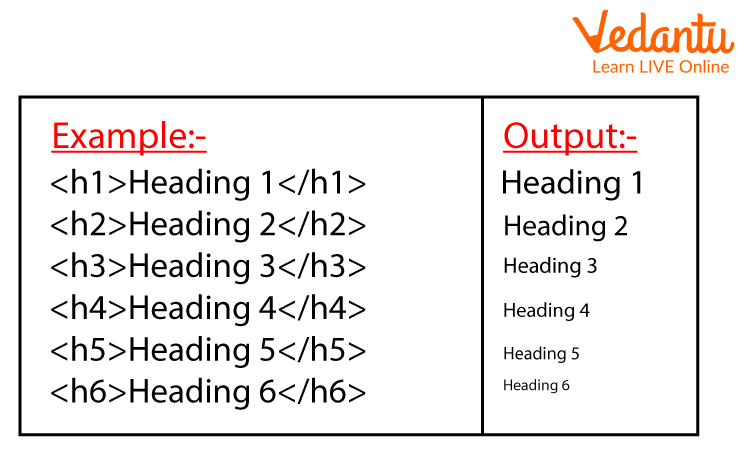
- Text Formatting Tags - Used for headings, paragraphs, bold text.
- Media Tags - Used to insert images, audio, and video.
- List Tags - Used for ordered and unordered lists.
- Link and Navigation Tags - Used to create hyperlinks.
Components and Structure
The basic HTML document structure contains essential components that every webpage must have.
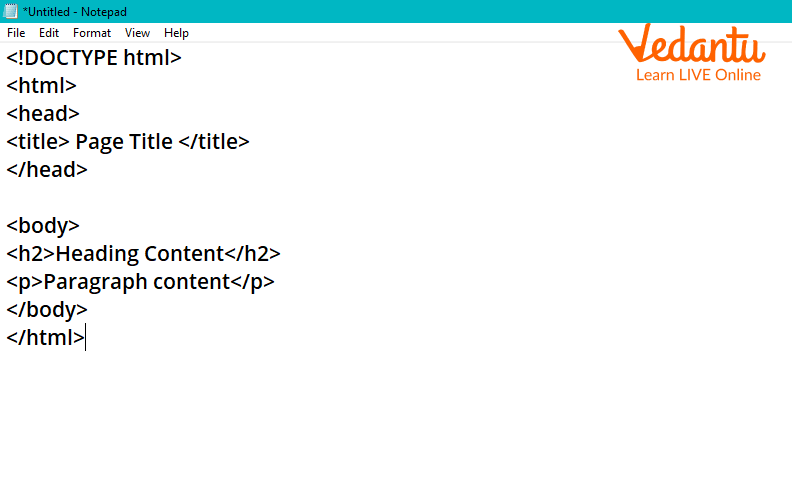
- <!DOCTYPE html> - Declares the document type.
- <html> - Root element of the HTML page.
- <head> - Contains meta information and title.
- <body> - Contains visible content of the webpage.
Syntax and Example
Basic HTML Syntax
<!DOCTYPE html>
<html>
<head>
    <title>My First Page</title>
</head>
<body>
    <h1>Welcome to HTML</h1>
    <p>This is a paragraph.</p>
</body>
</html>
This example shows a simple webpage containing a heading and a paragraph.
Common Tags Examples
Heading Tags:
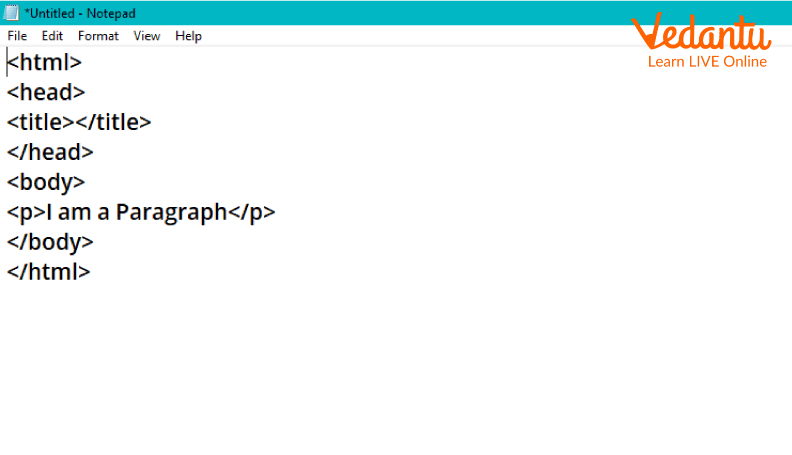
Paragraph Tag:
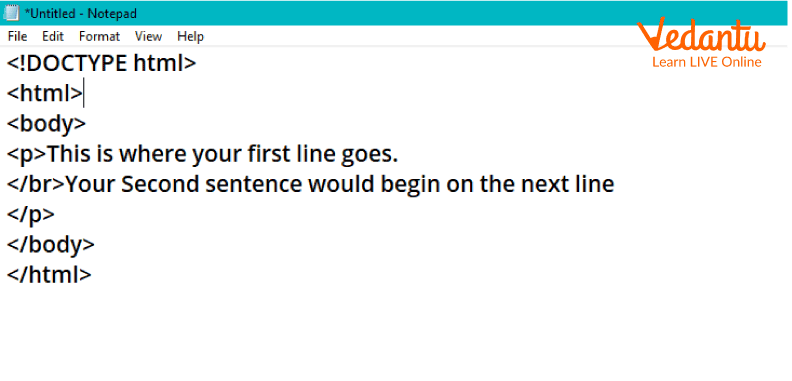
Line Break Tag:
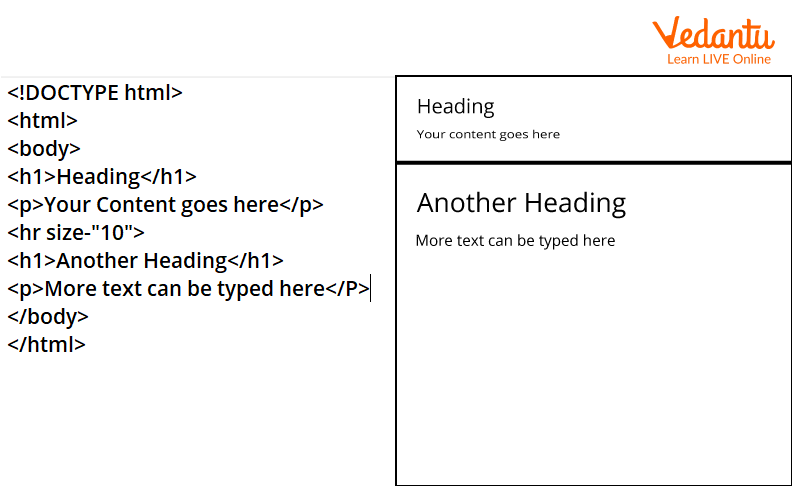
Horizontal Rule Tag:
Features and Characteristics
- Simple and easy to learn.
- Platform independent.
- Supports multimedia integration.
- Works with CSS and JavaScript.
- Provides semantic elements in modern HTML5.
Advantages
- Easy to create and edit web pages.
- Free and widely supported.
- Compatible with all browsers.
- Search engine friendly structure.
Disadvantages / Limitations
- Cannot create dynamic content alone.
- Limited functionality without CSS and JavaScript.
- Large websites require many HTML files.
Applications and Use Cases
- Designing static websites.
- Creating web forms and user interfaces.
- Developing blogs and portfolio sites.
- Building the structure of web applications.
- Educational projects and documentation pages.
Quick Facts About Working With HTML
| Feature | Details | Example |
|---|---|---|
| Type | Markup Language | HTML5 |
| File Extension | .html, .htm | index.html |
| Used For | Web Page Structure | Website Layout |
| Latest Standard | HTML5 | Semantic Tags |
These quick facts summarize essential information about HTML in computer science and its role in web development.
Key Terms - Glossary
| Term | Meaning |
|---|---|
| Tag | Keyword enclosed in angle brackets |
| Element | Complete structure including tag and content |
| Attribute | Extra information inside a tag |
| Browser | Software that displays web pages |
Interesting Facts About Working With HTML
- HTML was created by Tim Berners-Lee in 1991.
- HTML5 introduced audio and video support without plugins.
- HTML is not a programming language but a markup language.
- Every website on the internet uses HTML.
- HTML works with CSS and JavaScript to build interactive websites.
- Browsers ignore extra spaces and line breaks in HTML code.
Conclusion
Working With HTML is a foundational concept in computer science and web development. It provides the structure for all web pages and enables developers to present content effectively. By understanding HTML definition, working, types, features, advantages, and applications, students can build a strong base for advanced web technologies. Mastering HTML is the first step toward becoming a skilled web developer and creating functional, user-friendly websites.


FAQs on Working With Html for Web Development and Exam Success
1. What is HTML and why is it important in web development?
HTML (HyperText Markup Language) is the standard markup language used to create and structure web pages on the internet.
- Defines the structure of web content using elements and tags
- Works with CSS for styling and JavaScript for interactivity
- Forms the foundation of web development and front-end programming
- Essential for students, developers, and exam preparation in Computer Science
2. How does HTML work in a web browser?
HTML works by using tags to structure content, which the web browser reads and renders as a web page.
- The browser parses the HTML document
- Builds a DOM (Document Object Model) tree
- Combines HTML with CSS and JavaScript
- Displays formatted text, images, links, and multimedia
3. What are HTML tags and elements?
HTML tags are keywords enclosed in angle brackets that define elements in a web page.
- An element usually consists of an opening tag, content, and a closing tag
- Example: <p>This is a paragraph</p>
- Some elements like <br> and <img> are self-closing
- Tags help define headings, paragraphs, links, tables, and forms
4. What is the basic structure of an HTML document?
An HTML document follows a standard structure that defines the head and body of a web page.
- <!DOCTYPE html> declares the HTML5 version
- <html> is the root element
- <head> contains metadata, title, and links to CSS
- <body> contains visible content displayed in the browser
5. What are the different types of HTML elements?
HTML elements are categorized based on their display behavior and purpose.
- Block-level elements like <div>, <p>, <h1>
- Inline elements like <span>, <a>, <strong>
- Semantic elements like <header>, <article>, <footer>
- Form elements like <input>, <textarea>, <button>
6. What are HTML attributes and how are they used?
HTML attributes provide additional information about elements and are written inside the opening tag.
- Example: <a href="https://example.com">Link</a>
- Common attributes include id, class, src, alt, and style
- Attributes help in styling, linking, scripting, and accessibility
- Widely used in web development and exam-based coding questions
7. What is the difference between HTML and CSS?
HTML structures web content, while CSS styles and designs the content.
- HTML defines headings, paragraphs, images, and forms
- CSS controls layout, colors, fonts, and responsiveness
- HTML focuses on structure, CSS focuses on presentation
- Both are essential for front-end web development
8. What are the advantages and limitations of HTML?
HTML is simple and widely supported, but it has limitations without CSS and JavaScript.
- Advantages: Easy to learn, platform-independent, supported by all browsers
- Lightweight and suitable for static web pages
- Limitations: Cannot create dynamic functionality alone
- Requires integration with CSS, JavaScript, and backend technologies
9. What are semantic HTML elements and why are they important?
Semantic HTML elements clearly describe their meaning and improve SEO and accessibility.
- Examples include <header>, <nav>, <section>, <article>, <footer>
- Help search engines understand page structure
- Improve accessibility for screen readers
- Recommended practice in modern HTML5 development
10. How is HTML used in exams, interviews, and real-world applications?
HTML is commonly tested in academic exams and technical interviews as a core web development skill.
- Questions focus on syntax, tags, forms, and document structure
- Used in building websites, web applications, and email templates
- Forms the base for learning JavaScript frameworks and frontend tools
- Important for careers in software development, UI/UX, and web design
